# Outlook 365 for Android

# Adding a 365 mailbox to your phone

### Android (Outlook)

---

To add a 365 account to Outlook, first open Outlook then open the **Menu**

<figure class="image image_resized" id="bkmrk--1">![More button](https://lh3.googleusercontent.com/yYlOQLaGnoO7S3ol7FuJf33N1dwiIlDg9NrwLHiFg7PgOoqY3uhCQ5h1EcFPiPgTZFICJNZe_gZQXz8ZKZ9tGD8Rk39GJDrWFpIH5wRfEqbNqPwmVaQdKSrU7e-ypffzHXG8cHa1s4tEYcuNEdM_evM1HlGesfjj7-cG13303PQwzhPuQ5-VaGCDu1oUzw)</figure>&gt; **Settings**

<figure class="image image_resized" id="bkmrk--2">![Settings](https://lh6.googleusercontent.com/L0LZW2vPdv2RKX8dRWBOE-kHpak_fUV0lPB44Tj4da4-tpHNmfD0Z5d7EoCkNFWVp79WlWnSyPHK8DipOA7daVvZ22ZyTOqOcZUwFdTkH_azOIzYx5z5CgWHZq7Sp2L7G5IaG4aE3S8MNXmpkn3EpYV5iLyiR19WllBJUYM4nYpUozxRpyx5J5u9GXnrBg)</figure>&gt; **Add Account** &gt; **Add Email Account**.

Enter your full email address, then tap **Continue**.
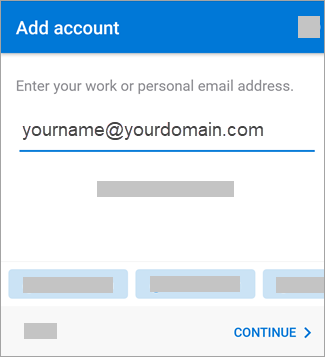
<figure class="image image_resized" id="bkmrk--3">![Enter your email address.](https://lh4.googleusercontent.com/3ZbxL-2tK5UVN7G5L7FWrBRXVSVZnPu2UmG6n34OY246O7heApnAyHAtrcJngW9t3QKpjfIFgZJaNybRFNti-oD2_h_9pSSsFUMRmP83eVf76WwsN4Qer9RzjlB9qBCTOsV9BtG5vG2bi138ZleJBfCGgGiWnuflQ0cq0mqa3EFNnRjx1TeLSfBFa4x4Hw)</figure>Enter your email account password and tap **Sign In** or **Next**.
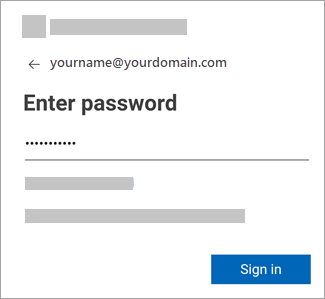
<figure class="image image_resized" id="bkmrk--4">![Enter your password for your email account.](https://lh4.googleusercontent.com/4hFVhv2GI_eHwihLmbWfhhT00kYKttAJmj-8w03kYeeq-1FfQC0XWUQG_-_2j2Wu_Yg_fibjV9tFoazFMWSgqx06rjb1kfWSXaq3a3tkq8D2tD3RNdDf82ShPGJkkN9aaTewsj6LYDeJTrHfKJV82_8K4mjEgYYgCobqGBYqDwzv5U1uBu1mDVCawELhiQ)</figure>That should be it! Your email should be added and working.